MagnetoCondition (MagnetoNodeConstraint)
A feature guide for preference-driven “magnetic” routing.
In enterprise routing, “best” is not only about shortest distances. It is also about operational acceptance: Routes should look logical, match how dispatchers think, and reflect soft business preferences that should not break feasibility.
MagnetoCondition (implemented as MagnetoNodeConstraint) is JOpt’s mechanism to express:
- Attraction: “These nodes should be on the same route.”
- Repulsion: “These nodes should be on different routes.”
- Optional ordering preference (for attraction): “This node should be in the front or back of the attracted node stack.”
MagnetoCondition is a soft-only feature due to architectural restrictions of the library and is handled via optimization costs.
- Example Source (GitHub): /condition/magnetic/MagneticSoftConditionExample.java
What MagnetoCondition does (conceptually)
MagnetoCondition attaches to a single node (the magnet). That node then pulls or pushes other nodes via preference penalties.
Attraction magnet
- Encourages selected target nodes to be on the same route as the magnet node.
- Optionally encourages the magnet to be near the start or end of the attracted node stack within the route.
Typical uses: - account owners + their priority customers - paired visits that dispatch wants together - keep geographically or operationally related tasks together (softly)
Repulsion magnet
- Encourages selected target nodes to be on a different route than the magnet node.
Typical uses: - risk separation (e.g., two high-value deliveries) - avoid mixing customer groups - dangerous goods - avoid bundling tasks that cause operational friction
Visual effect of magneto condition (map comparison)
Use these two map images to understand the impact of the magneto condition from our example.
Without Magneto Condition
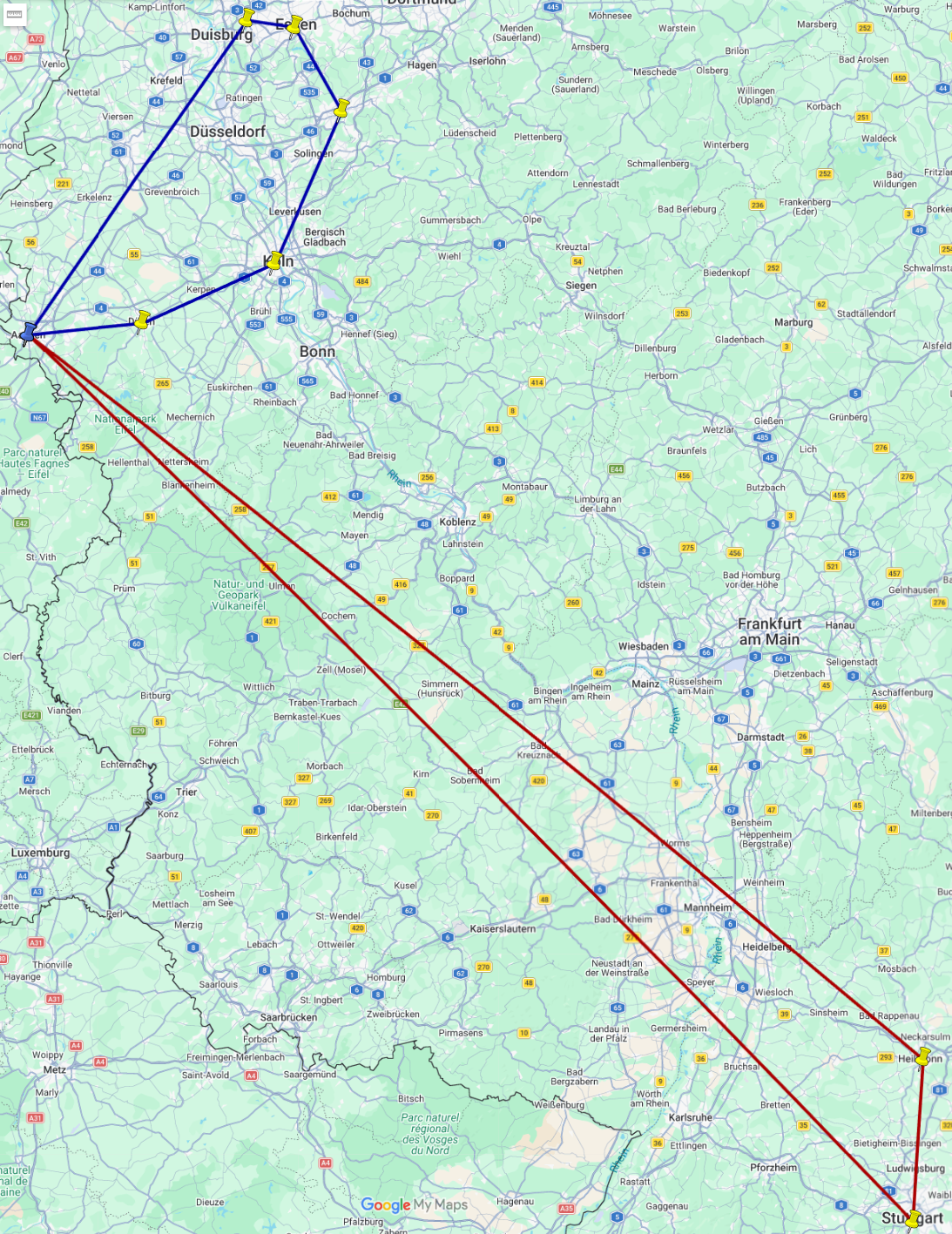
- Routes lookes geographically optimal.
With MagnetoCondition
Attraction magnet on Stuttgart
- Stuttgart is configured as an attracting magnet
- It adds "Aachen" as a magnet target
- It also sets an ordering preference: NodeOrder.FRONT
(Stuttgart should be at the beginning of the stack of attracted nodes)
Repulsion magnet on Koeln
- Koeln is configured as a repulsive magnet
- It adds "Wuppertal" and "Essen" as magnet targets
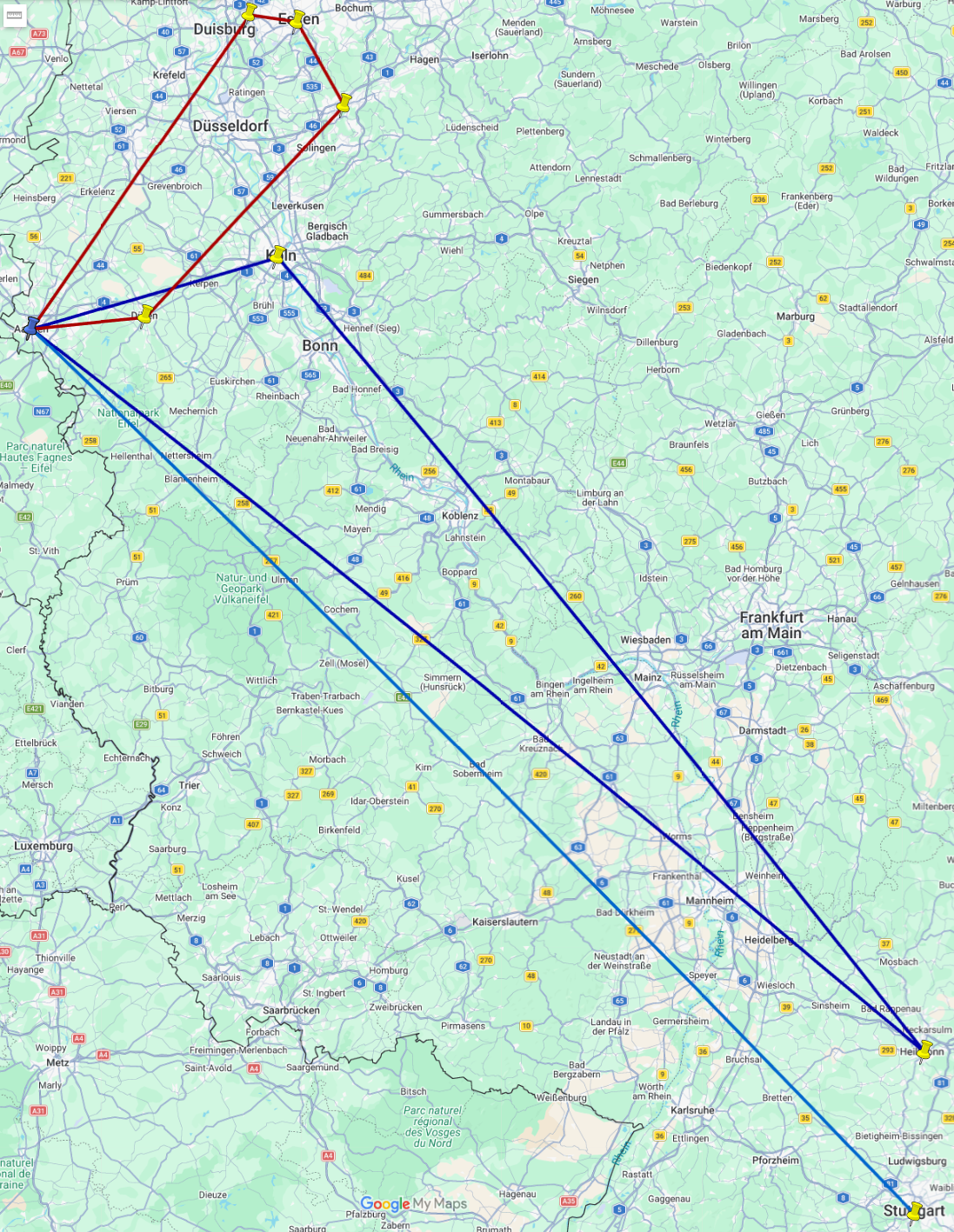
- Routes appear more coherent (desired nodes grouped or separated).
- Better acceptance with dispatchers and end users.
Core configuration model
MagnetoCondition is typically configured with:
1) Magnet mode
- Attraction (same route)
- Repulsion (different route)
2) Magnet targets
Targets are referenced by node IDs (or stable business IDs).
Recommendation: - Use stable IDs (order IDs / customer IDs / task IDs), not labels.
3) Optional order preference (attraction only)
FRONT— prefer the magnet node to be the first node in the stack of attracted nodesBACK— prefer it to be the last node in the stack of attracted nodesNO_ORDER— no ordering preference
This is useful for “anchor tasks” like: - VIP customer should be earlist, - first checkpoint should happen earlist, - last drop-off should happen at the stack-end.
Implementation guide (how to use it)
Step 1 — Choose the magnet node
Pick a node that acts as the “anchor”: - a VIP customer, - a key inspection/checkpoint, - a visit that should coordinate the route structure.
Step 2 — Decide whether you need attraction or repulsion
Ask:
- “Do we want these together?” → attraction
- “Do we want these apart?” → repulsion
Step 3 — Define target IDs
List the node IDs that should be attracted/repulsed.
IMPORTANT: Keep the list small and meaningful.
MagnetoCondition is best for specific coordination rules, not for broad clustering (use clustering construction for that).
Step 4 — Attach the constraint to the magnet node
Attach it to exactly the node that acts as the magnet.
Step 5 — (Optional) Apply an order preference (attraction)
Only use FRONT/BACK if there is a real business reason.
Otherwise, leave it at NO_ORDER (default).
Common patterns (ready-to-use recipes)
Pattern A — “Keep this customer and these tasks together”
- Attraction magnet on customer A
- Targets: related tasks (returns, service follow-ups)
- Optional order:
FRONTif customer A should be visited early
Pattern B — “Separate risky or sensitive tasks”
- Repulsion magnet on task X
- Targets: tasks that must not share a route (risk, compliance preference, customer requirements)
Pattern C — “Route anchor”
- Attraction magnet on a checkpoint node
- Targets: a small group of tasks
- Order:
FRONTto make the checkpoint visually and operationally “the start”
Practical limits and pitfalls
-
Do not use magnets to enforce hard business rules.
If something must never happen, model it as a hard constraint (architecture). -
Avoid huge target lists.
If you need broad grouping, use clustering construction or zone/territory logic. -
Magnets are preferences, not guarantees.
If time windows/skills/working hours conflict, the optimizer may violate magnets to remain feasible and optimize overall cost.
Example reference
A runnable example that demonstrates attraction + ordering and repulsion together:
Example Source (GitHub): /condition/magnetic/MagneticSoftConditionExample.java
Summary
MagnetoCondition is the lightweight way to encode “human logic” into optimization:
- Attract to keep specific nodes together
- Repel to keep specific nodes apart
- Optionally influence front/back positioning for anchor nodes